Due September 6!
A blog (web-log) is an ongoing journal, hosted online. In the traditional format, a blog writer posts a topic, and solicits feedback from subscribers. This is a blog you are reading right now. For purposes of this course, we will use this blog to deliver information regarding assignments and also to get your feedback on these assignments
Click to View: Blogs In Plain English
You will need to set up your very own personal blog to in order to record your thoughts and discoveries during this course. I recommend that you use Blogger*, a popular free online blog hosting service that is extremely easy to use.
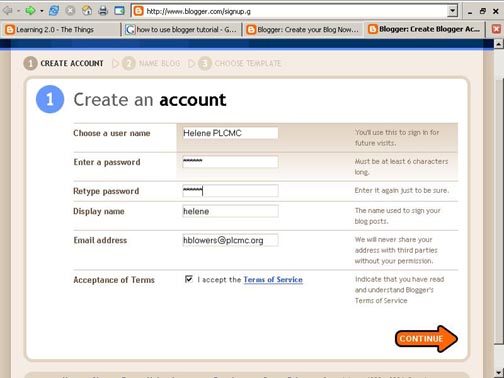
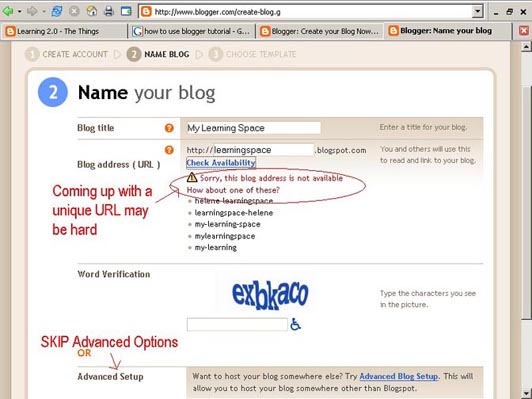
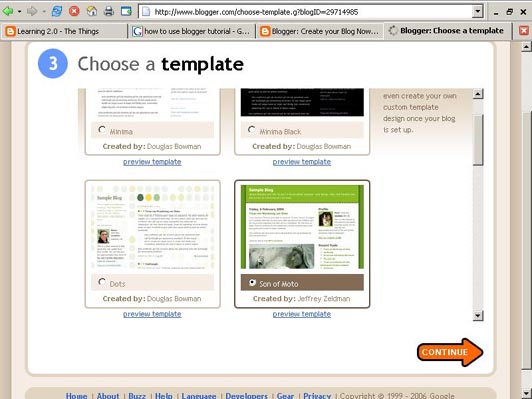
Creating a blog using Blogger takes just three steps:
1. Create an account (view screenshot)
2. Name your blog (view screenshot)
3. Select your template. (view screenshot)
Once you’ve created your blog here are two important things to know:
To add posts: The interface that you will use to add posts, edit or change the step-up your blog is accessed online at http://www.blogger.com/ Be sure to write down your login and password.
To view your blog: Your blog address is http://(xxxx).blogspot.com, (xxxx)=the unique identifier you entered in Step 2. Be sure to also write down your blog address.
If you run into problems or would like more information about blogs and using Blogger click here: Blogger’s Quick Tutorial or visit the HELP section on the Blogger site.
OK -- Now, it’s your turn...
Assignment One:
1. First, read this article: Engage Me or Enrage Me! (This may take a minute to load.)
2. Next, setup a blog for yourself through Blogger.
After your blog is set up, do the following:
3. Post your thoughts about the article and about how the use of blogs might create engagement in the classroom setting. This is an opportunity to publish all of your thoughts, discoveries, web sites, ideas, etc.
AND
4. Give any ideas you might have about things you would like to learn about during this course. I have many things planned but would like to hear from you also.
Again, keep in mind when posting to your blog: The world is your audience! Take this opportunity to create a PROFESSIONAL blog that you might be able to share with a prospective employer.
After creating your blog, share it with all of the course participants by posting your blog address under the What's Your Blog Address post on this class blog.
IMPORTANT NOTES: How you choose to identify yourself on your blog is your choice. You can blog under a screen name, anonymously, or as yourself. Use of Blogger is only a recommendation. If there is another blog hosting site that you are more comfortable with, please feel free to use it.

No comments:
Post a Comment